Augmentative and alternative communication (AAC) is a term that is used to describe communication devices used for people with impairments in their use and development of written or spoken language. There are two types of AAC devices that help people communicate. The first type is a low tech device which would be something that does not require batteries or electricity. The second type, a high tech device, would be something that allows electronic messaging.
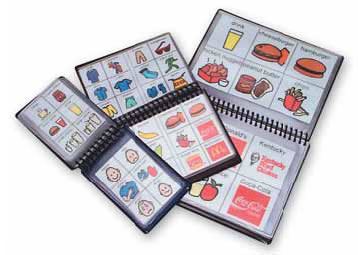
An example of a no/low tech device is a communication book or board. This type of device is used to communicate an individual's wants and needs by pointing to the appropriate picture or grouping designated in the book. Communication books are fairly accessible and can be found anywhere from amazon.com to local bookstores.
 A high tech example is an electronic pointing device. This can be used to control the cursor on a computer without the use of hands through ultrasound, infrared beams, eye movements, nerve signals, or brain waves. This device allows a person to communicate their thoughts through their body language which can be interpreted by a computer device. This device is a breakthrough for people who want to communicate further than something like a communication board will allow them. This type of device would be great in a classroom because it allows the students and teachers to communicate on a much higher intellectual level.
Accessibility:
Input devices are hardware and software options for a wide variety of special needs students that give them the opportunity to participate in their own communication especially in a classroom.
 A software option for special needs students is an application on the ipad called VoiceOver. This program is especially good for blind students because it allows you to brush your fingers over the screen where it will read aloud the application names so you can choose the correct thing accordingly. Although this type of application is available on other electronic devices, the ipad is recommended because of its size and mobility compared to a larger desktop computer.
In general, the ipad is a wonderful hardware for use with disabilities because of the variety of uses and features. The ipad has a feature where with just a touch of the fingertips, it can zoom in/out of any text, picture, etc. which would be convenient for the visually impaired. The ipad is far more accessible then a clunky computer. It can also translate languages easily and can read pages and information aloud (see software above). The ipad can act as an interactive device allowing users to communicate, explore, and create their own ideas.

No comments:
Post a Comment